A big change at AiTalk.ch — AI Work Apps now handle real company work

Something big has changed at AiTalk.ch. AI Work Apps are here.
Build and run AI Work Apps — under your control.
And AI Talk is no longer only a Cloud service. You can now install it yourself on your own computer or company server with Self-hosted — so your accounting data never has to leave your company. For your own company's work, Self-hosted is free.
Every company has work that comes back every day, every month, every quarter and every year. You send invoices every day, sort the receipts that come in, file a VAT return every three months and do the year-end closing every year. Nobody enjoys it — and it is work where a single wrong number is not an option.
We do the same work in our own company. So to handle this real company work, we upgraded our AI Talk system into Work Apps. We started with what we know best — our own company's accounting — and today we use these apps in our own companies.
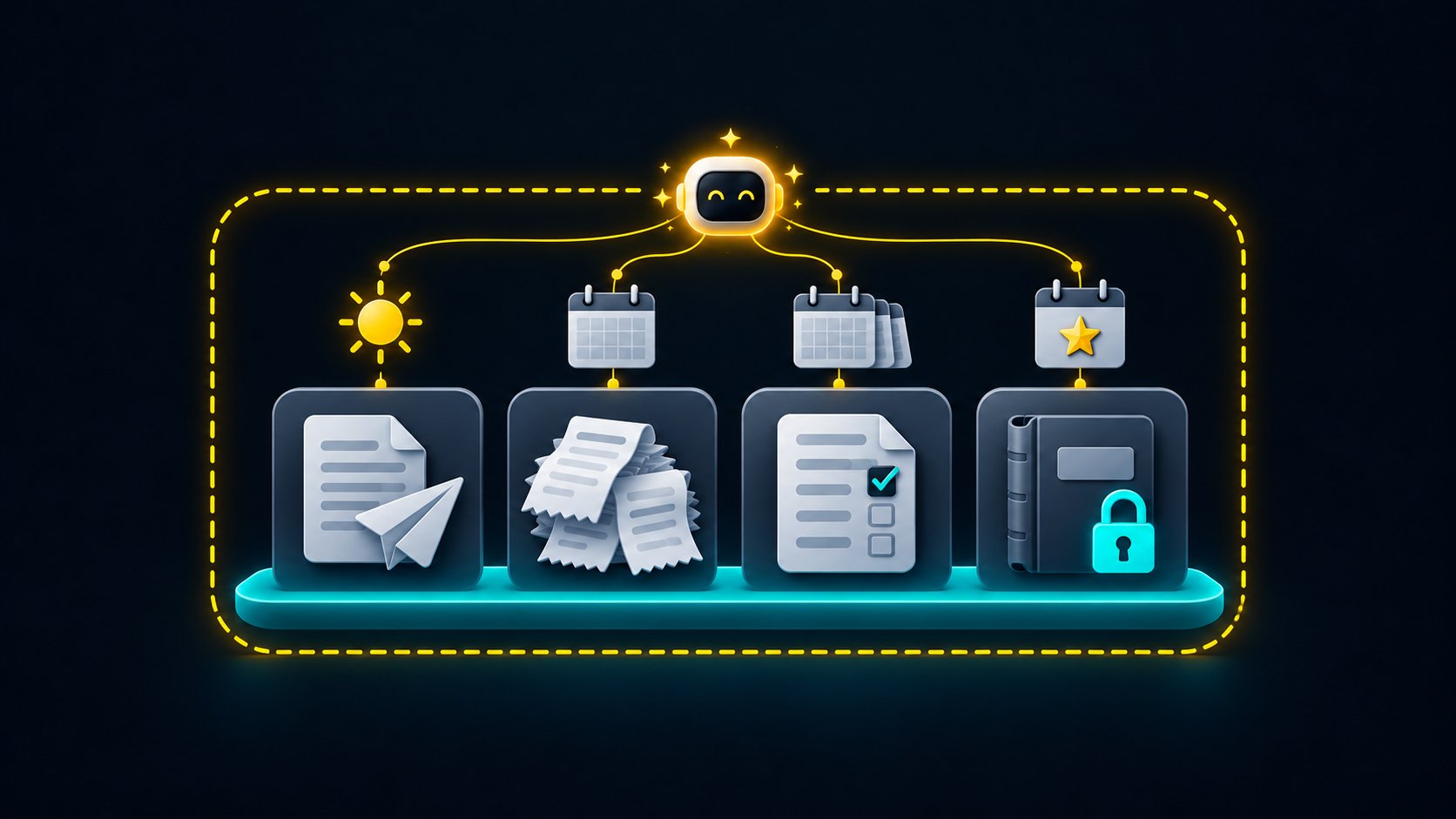
The gap between two approaches
Today there are two main ways for a company to automate work with AI.
The first is workflow automation tools. They are excellent at repeating the same steps the same way, every time. But when the input changes even a little — the bank changes its file format, or a receipt arrives as a crooked photo — someone has to fix the flow.
The second is AI agents that plan and write their own code. They understand new material on the spot and adapt. In return, the AI is given broad access, and it is up to you to decide what to block. They are efficient, but for work where one number or one email affects your company's reputation, it is hard to know in advance what the AI will do next.
Most real company work sits in between: the same task every quarter, but never the same files twice. That is exactly the gap Work Apps were built for.
What a Work App is
An AI Work App is an app for one piece of hard work. You tell the AI what you need, it does the work inside the app, and a person confirms the steps that matter — issuing, sending and closing a period.
Every Work App has the same screen. On the left, your work split by month or quarter, so you always know where you are. In the middle, the chat with the AI — tell it what to do, or ask it how the app works. No manual needed. On the right, the app itself: tables, documents and calculated results.
Take a Swiss VAT return, for example:
- Upload this quarter's bank statement, expense receipts and sales invoices.
- The AI matches each bank transaction with a receipt or an invoice.
- The AI asks — all at once — only what it cannot know on its own: "What was the CHF 480 payment on 14 November?"
- The numbers for the VAT form are calculated by fixed code.
- You check and close the period — and the quarter is locked.
The AI does not "file your VAT for you". The AI prepares the return, and a person checks and submits it. The responsibility stays with the company — and we think that is how it should be.
Why the numbers are right
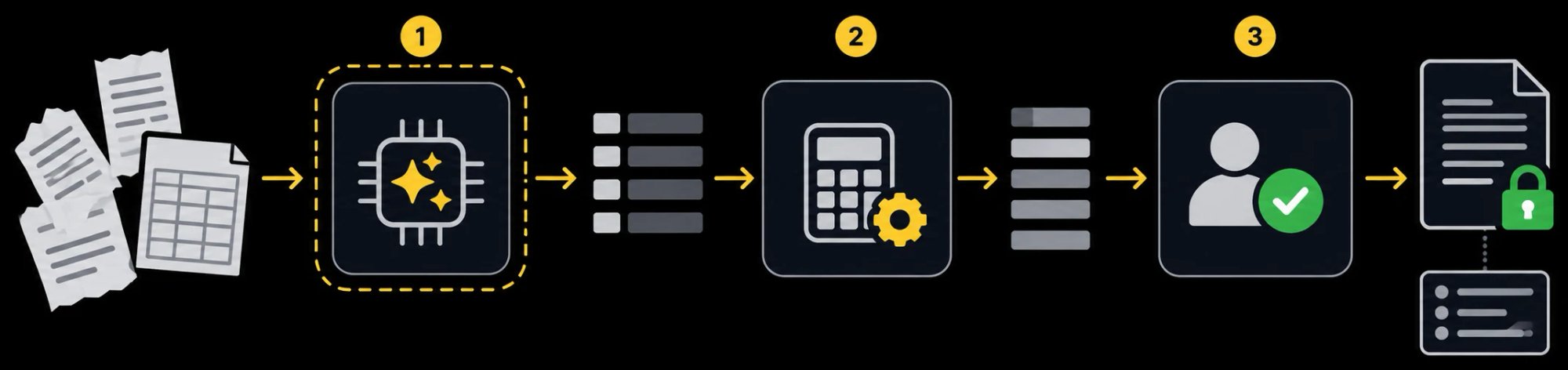
Work Apps are built for work where a wrong number is not an option, so the work is split between three hands.
- The AI reads and sorts — different file formats, scanned receipts, odd cases: the parts that take people the longest. Only with the tools the app allows.
- Fixed code calculates — the AI does not calculate amounts. Tested code does, and the AI only passes the numbers on. There is no place for the AI to make up a number.
- You confirm, then it's locked — closing a period is always done by a person. A closed period is locked, and every change records who made it — a person or the AI.
Why the AI can't cross the line
Today's AI agents will do whatever it takes to reach a goal. The AI in a Work App never gets those keys in the first place.
- It only uses the tools it's given. It has no tool to run commands, execute code or browse the internet freely.
- It can't see other data or passwords. It can't read other companies' or other apps' data, and connection passwords are never shown to the AI.
- A person presses the button for anything that leaves. Issuing an invoice, sending an email and closing a period all need a person to press a button — enforced by the server, not just the screen.
- The AI can't touch the record. The AI has no tool to delete or edit the record.
So even if a file tricks the AI with hidden instructions, it still can't issue an invoice, send an email or close a period. A person always presses that button.
Of course, other AI tools are quickly adding permission checks and admin settings too. The difference is not whether there is a fence, but who decides where it goes. A general-purpose AI starts wide open, and you block what you don't want. In a Work App, what the AI can do is defined by the app from the start.
There is a trade-off. Because the scope is narrow, a task the app doesn't cover means the Work App has to be extended. That work is on us, not on the customer — and once it's extended, every company using the same app gets it.
What you can use today
AI Talk Cloud comes with four accounting Work Apps:
- Receipts · Invoices · Bank ledger — any country
- VAT return — Switzerland
These are the very apps we use in our own companies. No installation, no API keys, and your data is stored in Zurich, Switzerland. Your data is never used to train AI. You can try it free for 14 days.
AI Voice — the AI answers the phone, too. AI Talk Cloud also includes AI Voice. Add a new phone number for your AI, and it answers calls to that number 24/7, replies from your knowledge documents, books appointments and puts what callers report into a Work App table. Calls straight from your website work too. If you like, you can forward only the calls you miss on your existing number to the AI number — that is optional. AI Voice is available in AI Talk Cloud only; it is not included in Self-hosted.
If your accounting data must not leave your company — Self-hosted
Accounting data is the most sensitive data a company has. It holds your customers and suppliers, amounts, bank transactions, costs and profit. That is why many companies want to use AI, yet stop at these questions:
- Will our accounting data be stored or processed on servers in another country?
- Will our data be handed over as-is to an outside AI service (an LLM — large language model)?
These are fair concerns. In AI Talk Cloud, your data is stored in Zurich, but some of the Cloud's AI models are processed within the EU/EFTA or globally. For companies that want to avoid even that, AI Talk now also offers Self-hosted.
AI Talk Self-hosted is AI Talk installed on your own computer or company server. The tables, files, chats and work history of your Work Apps are all stored in your own database — they never pass through our servers.
And the company chooses where the AI runs:
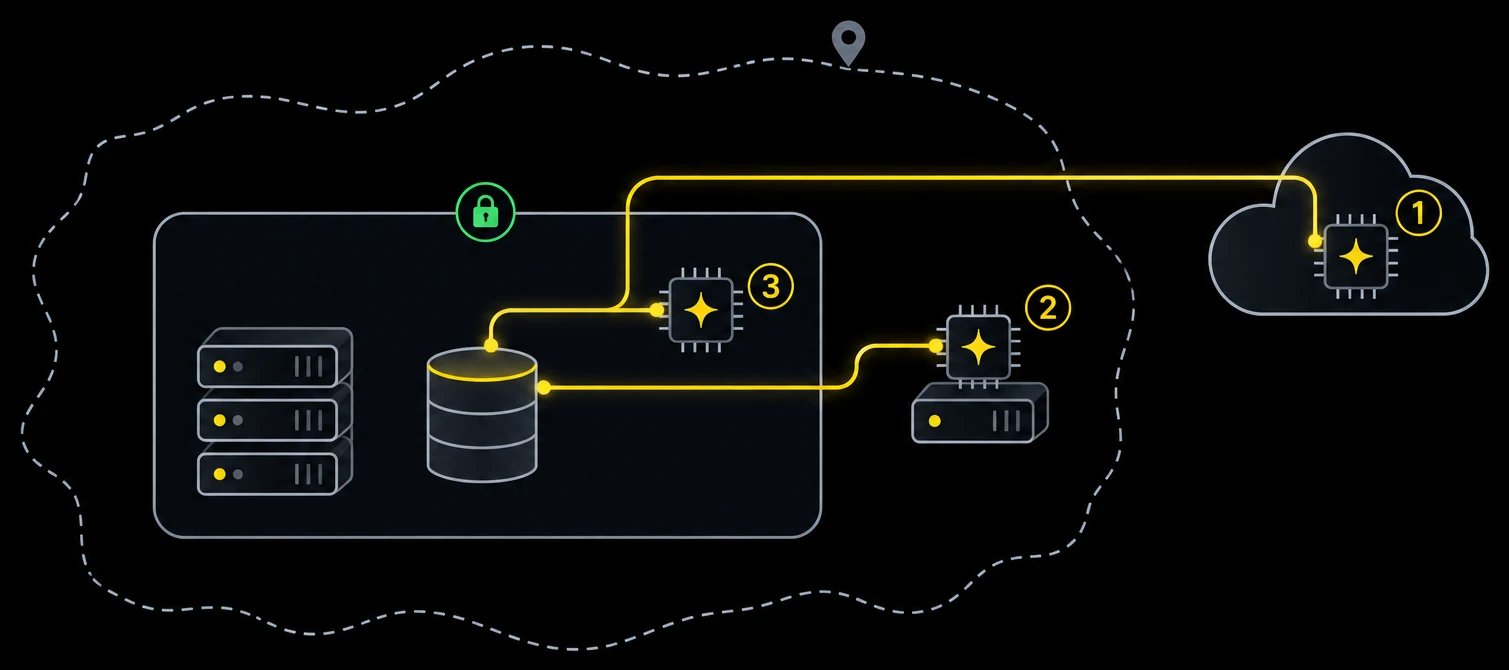
- Cloud AI — OpenAI · Azure OpenAI · Anthropic Claude. The easiest option, but the text the AI reads goes to that service provider.
- In your country — for example, an LLM hosted in Switzerland for a Swiss company. You can keep your data from leaving the country.
- On your own server — a local LLM running on your company server. In this case nothing leaves your company network, and it works even without internet access.
How far your data goes is decided by your company, not by us. Self-hosted is free for your own company's work, and the source code is public on GitHub (source-available), so you can check for yourself what runs and how.
A Work App for your own company
Every company works differently. That is why you can also build Work Apps yourself — in two ways.
With blocks — for work that isn't too complex
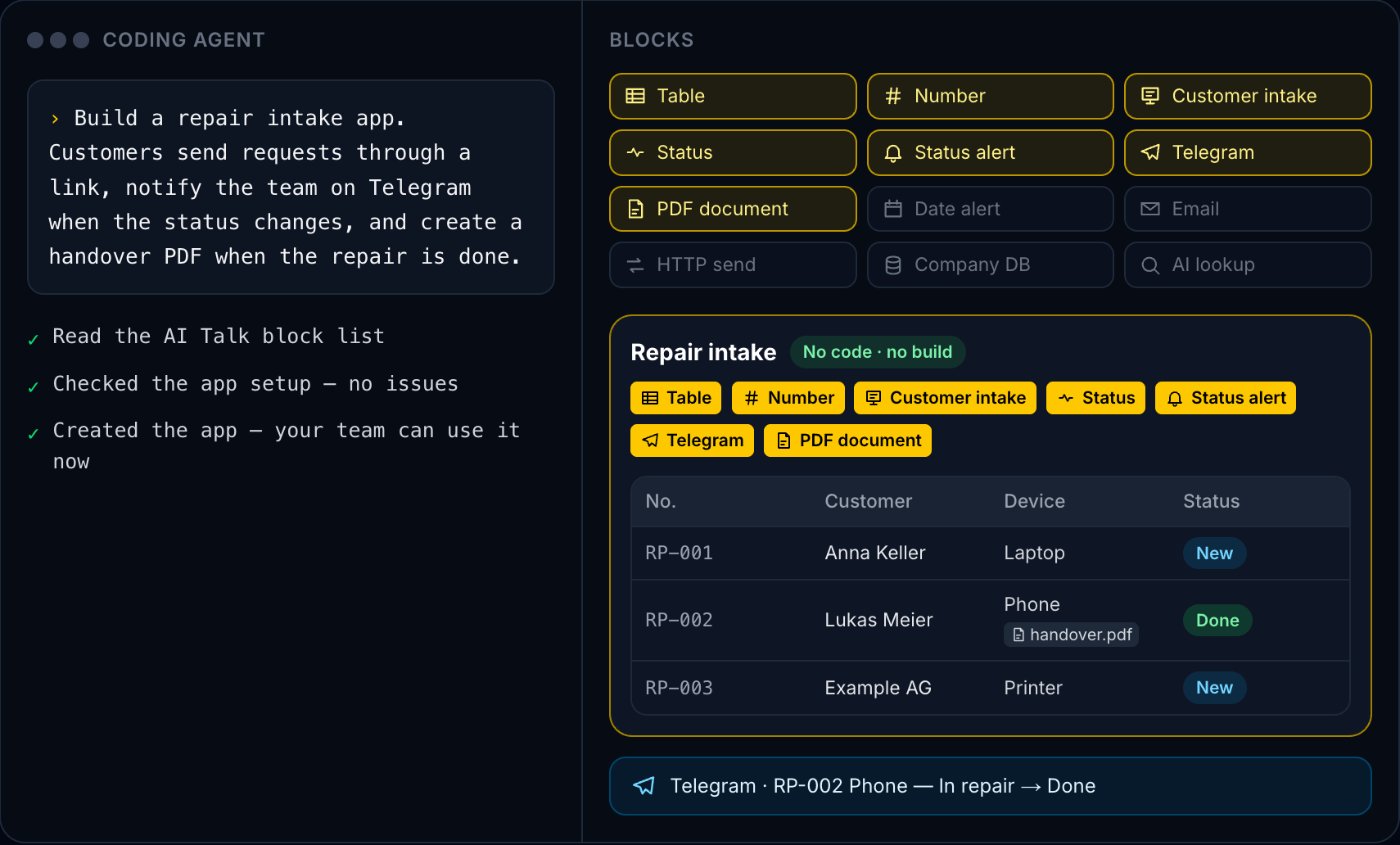
Connect a coding agent such as OpenAI Codex, Claude Code or Google Antigravity to AI Talk over MCP — on AI Talk Cloud (get a key under Settings → MCP) or on Self-hosted. Then describe your work in plain words: “Build a repair intake app. Customers send requests through a link, and the team gets a Telegram message when the status changes.” The coding agent picks ready-made blocks that we have built and tested — tables, statuses, alerts, customer intake, PDF documents, Telegram, HTTP, webhooks, your company database — checks the setup and creates the app. No code to write, nothing to rebuild, and your team can use it right away. On Cloud, customers can even call in through AI Voice. (Self-hosted does not have the SMS and calendar blocks yet, and has no phone calls.)
With modules — for precise work
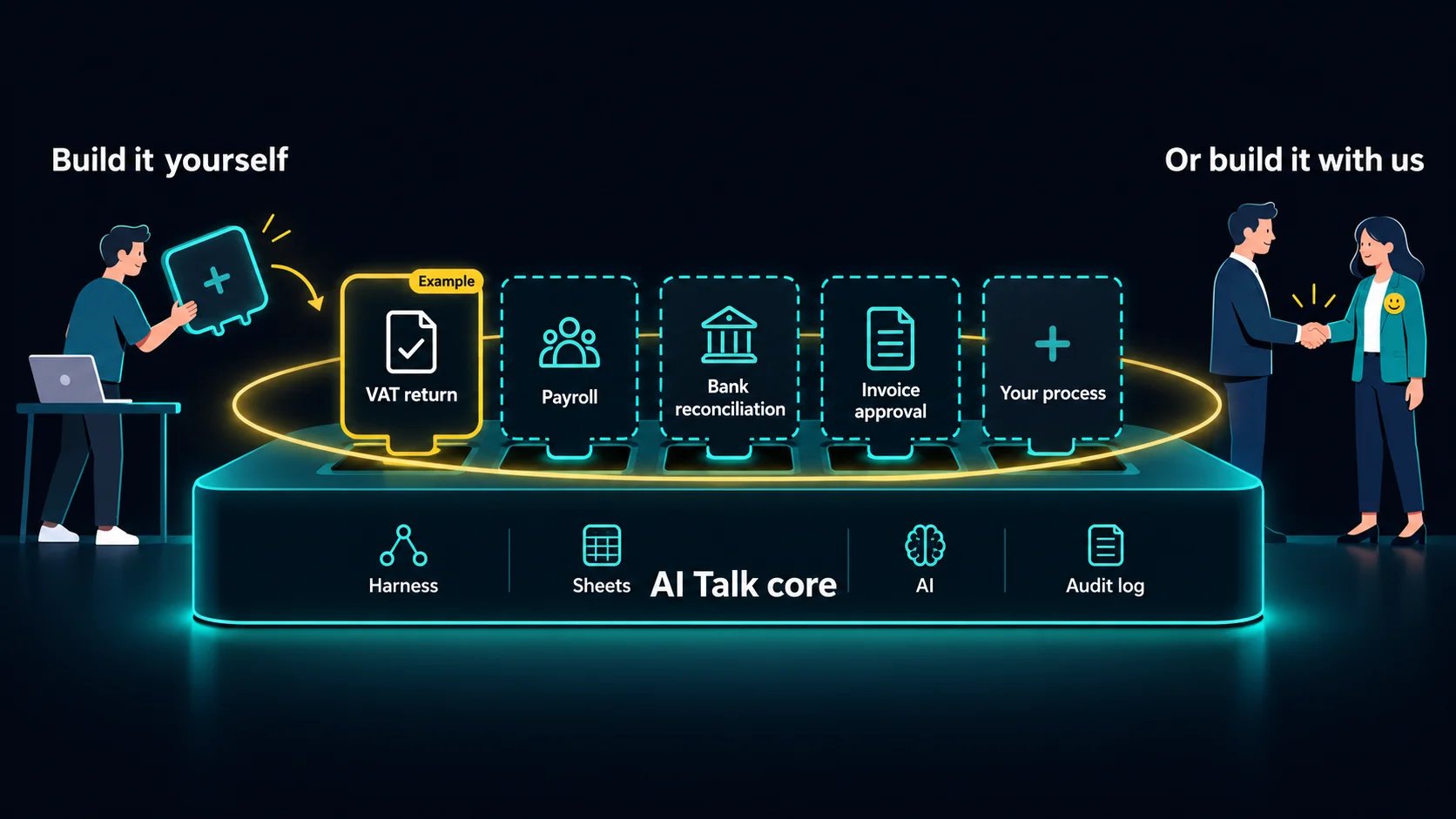
Work where no number may be wrong and the rules are many — VAT returns, payroll, bank reconciliation — needs more than blocks. It is built as tested code (modules), just like our own accounting Work Apps. Install AI Talk Self-hosted on your laptop or company server and open it in your coding agent: it reads our step-by-step guide and writes the modules and the Work App in code. This needs programming experience (TypeScript). Either way, the app runs inside the same fence, on the same tables and with the same work history. Self-hosted is free for your own company's work, and the source code is public on GitHub (source-available).
For firms serving many client companies, there is AI Talk Business, which adds enterprise features and a commercial license. If building it yourself is too much, tell us how your work goes — we'll build it with you.
What this change means
In short, this change means four things.
First, AI goes from "something that answers" to "a colleague that gets the work done." What matters is not how well the AI talks, but the work that is finished.
Second, control stays with people — all the way. The more work AI does, the more important it becomes what it cannot do. In a Work App, the app defines what the AI can do, fixed code does the numbers, and a person closes the period. "Build and run AI Work Apps — under your control" is that promise.
Third, any hard work can become a Work App. Our first Work Apps are for accounting because that is the work we know best. Simpler work — intake, bookings, contract tracking — your coding agent can assemble from blocks today, on Cloud or Self-hosted. Precise work like payroll is added as modules on the same foundation. And several Work Apps can be connected into one flow on the Agent Studio canvas.
Fourth, your accounting data stays where you decide. You can start right away in the Cloud, or run everything with Self-hosted on your own server and the AI your company chooses. You don't have to give away your company's data to use AI.
Nothing changes for customers who use our voice agents. Calls will be answered just as they are today, in AI Talk Cloud. But from now on, AI Talk will put most of its energy into all the work that remains after the call ends.
AI Work Apps — build and run them, under your control.